What is DevClean?
DevClean is a Mac app for developers who need to find and safely clean large disposable project folders.
 DevClean
macOS developer cleanup
Clean up project folders like node_modules, Pods, DerivedData, and build caches without guessing what will be removed.
Version 1.1.0 with Super Clean. For macOS 13 or later, on Apple Silicon and Intel Macs.
DevClean is a Mac app for developers who need to find and safely clean large disposable project folders.
It detects common development folders including node_modules, Xcode DerivedData, Pods, Gradle caches, Python caches, Rust target, and SwiftPM builds.
DevClean scans only folders you choose, shows every result, and moves selected folders to Trash by default.
Simple review flow
DevClean is designed for people who understand that build folders are disposable, but still want a clear review step before anything changes.
Select the project, workspace, Xcode, or cache folder you want DevClean to scan.
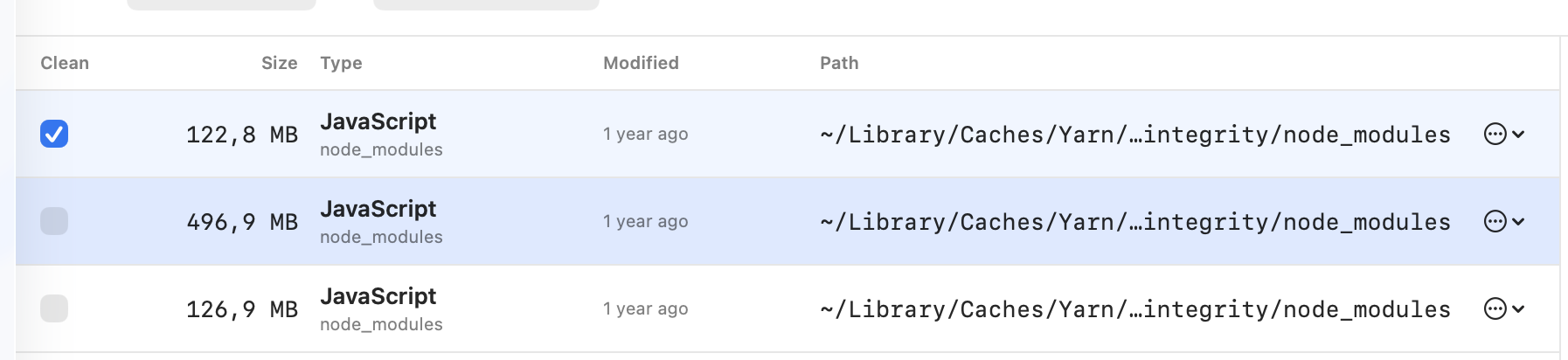
See size, folder type, modified date, and path for every found folder.
Click any row to include or exclude it. Use Always Keep for folders that should never appear again.
Clean selected folders safely. Permanent deletion exists only in Advanced settings.
Use cases
DevClean is built for cleanup moments that are common in active development work, especially when the folder is generated and can be recreated later.
Find repeated node_modules, package cache, dist, coverage, and build output folders across many projects.
Review DerivedData, simulator caches, DeviceSupport folders, unavailable simulators, archives, and other Xcode storage.
Clean Pods, Gradle caches, Python caches, Rust target folders, SwiftPM builds, Docker build cache, and Colima data.
Cleanup targets
DevClean focuses on generated folders that can usually be recreated by package managers, build tools, or Xcode.
Cleanup guides
These pages are written for people searching for a specific cleanup problem, with short answers and practical review steps.
Why developers use it
One workspace can contain many copies of dependencies, build output, simulator caches, and generated files. DevClean makes those folders visible, sortable, and easy to review.
Scan results show folder size and path before cleanup.
DevClean is purpose-built for development folders, not general Mac maintenance.
File paths, scan results, and cleanup history stay on the Mac.
Safety model
DevClean starts with safe cleanup types and makes irreversible actions harder to reach.
DevClean does not scan the whole Mac unless the user explicitly chooses a broad folder.
Every detected folder is shown before cleanup with size, type, and path.
Moved items can be restored until the Trash is emptied.
Permanent deletion requires an explicit Advanced cleanup method choice.
Purpose-built
DevClean focuses on development folders where path, project context, and cleanup method matter. It avoids broad system cleanup and keeps every result reviewable.
| Criteria | General Mac cleaner | Manual Finder cleanup | DevClean |
|---|---|---|---|
| Developer targets | Broad app caches, system storage, and generic temporary files. | Only the folders you already know to search for. | Finds node_modules, Pods, Xcode DerivedData, simulator data, package caches, and build output. |
| Project context | Often grouped by broad category, outside the project workflow. | You must inspect each folder path yourself. | Shows each result with folder type, size, modified date, and path. |
| Selection control | Usually category-level or app-level choices. | One folder at a time in Finder. | Select, clear, filter, and review individual results before cleanup. |
| Default cleanup | Depends on the cleaner and selected action. | Manual delete or manual move to Trash. | Moves selected folders to Trash by default so they can be restored before Trash is emptied. |
| Large workspaces | Not optimized for repeated dependency and build folders. | Slow to find duplicates across many projects. | Scans chosen roots and surfaces repeated generated folders across projects. |
| Advanced cleanup | Risk level can be hard to understand from broad labels. | Fully manual, with no built-in safety explanation. | Permanent delete is an explicit advanced choice, separate from Move to Trash. |
| Best use | General storage maintenance. | Small one-off cleanup when you know the exact folder. | Developer disk cleanup with clear results, project context, and safer defaults. |
Answers
Choose the folder where you keep projects, scan with DevClean, review each node_modules result, unselect anything you want to keep, then move selected folders to Trash.
Yes. DevClean can detect Xcode DerivedData and other Xcode-related folders such as individual archives, DeviceSupport versions, unavailable simulators, simulator runtimes, and CoreSimulator caches.
Move to Trash is the default. Permanent deletion is available only in Advanced settings and shows a separate warning.
No. DevClean works locally. It does not upload file names, folder paths, scan results, or cleanup history.
Direct download
Download DevClean 1.1.0 with Super Clean for macOS 13 or later. The app is signed with Developer ID and notarized by Apple for direct distribution.